

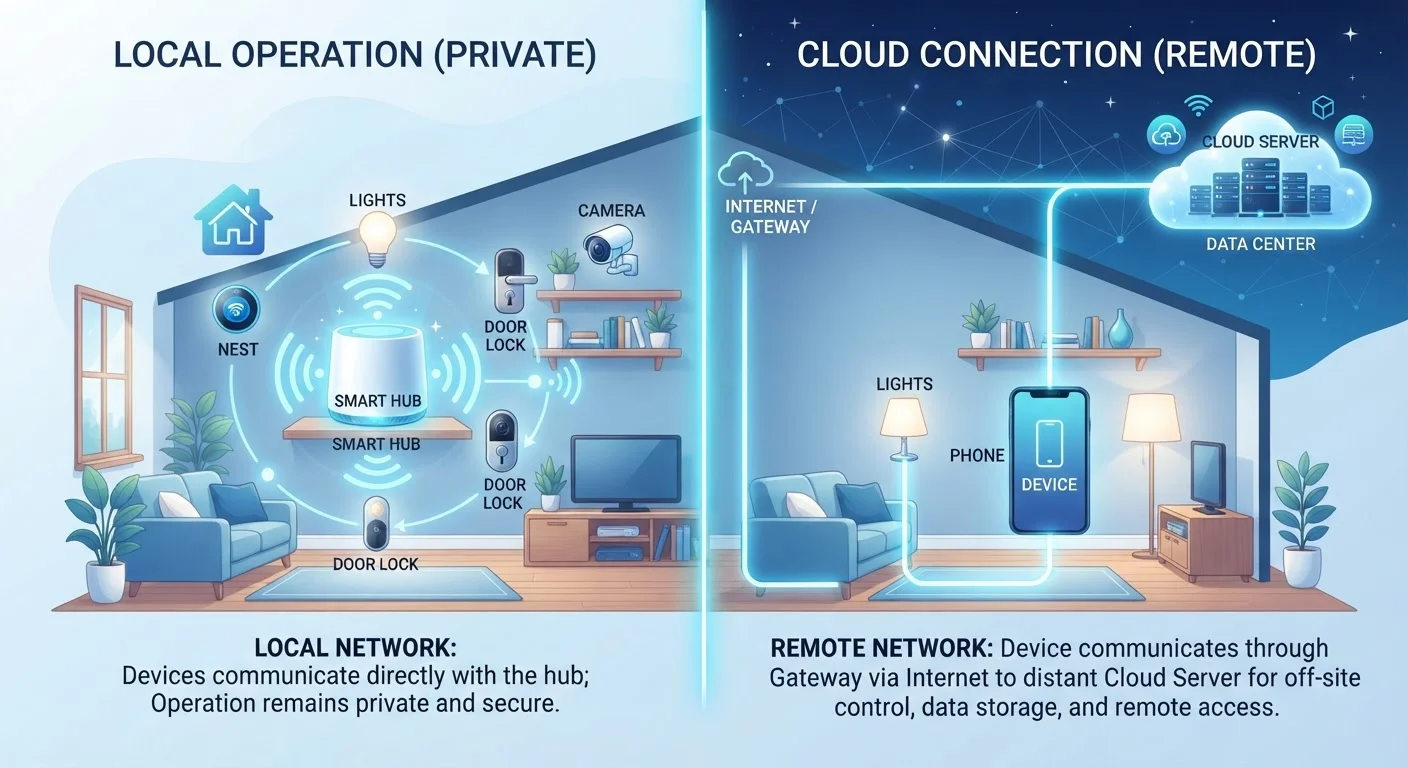
Option A
Local Processing Smart Devices
The self-sufficient, privacy-forward approach.
Best for: Households that prioritize reliability, data privacy, and operation during internet outages.
Option B
Cloud-Dependent Smart Devices
The feature-rich, always-connected alternative.
Best for: Users who want frequent updates, remote access from anywhere, and richer AI-powered features.
What 'Local' and 'Cloud-Dependent' Actually Mean
When a smart device processes information locally, it means the computation happens on hardware inside the device itself - or on a hub physically located in your home. No internet connection is required to complete the task. A locally processed smart lock, for example, can still respond to a keypad code or a shortcut routine even when your router is offline.
A cloud-dependent device, by contrast, sends data to remote servers owned by the manufacturer or a third-party platform. The servers do the heavy lifting and return a response. That round trip - your device to the cloud and back - typically takes a fraction of a second on a fast connection. But it means every command depends on your internet being up, the company's servers being operational, and that service continuing to exist.
This distinction affects far more than just outage resilience. It shapes privacy, longevity, and how much control you actually have over the devices in your home. For a broader look at how this trade-off plays out across connected technology, see local vs. cloud processing in smart home devices.
| Criterion | Local Processing | Cloud-Dependent |
|---|---|---|
| Works without internet | Yes - fully functional offline | No - requires active connection |
| Data privacy exposure | Low - data stays on-premises | Higher - data sent to external servers |
| Feature richness | Limited by local hardware | Expanded via cloud compute |
| Vulnerability to server shutdown | Not affected | Device may become unusable |
| Remote access from outside home | Requires extra configuration | Built-in and straightforward |
| Software update frequency | Less frequent; firmware-based | More frequent; server-side updates |
| Setup complexity | Moderate - hub often required | Generally simpler out of the box |
Reliability, Privacy, and Longevity: Where Each Approach Stands
Reliability is often the most immediate concern. Cloud-dependent devices introduce multiple points of failure: your home internet, the manufacturer's servers, and any third-party authentication services involved. Local devices reduce that chain significantly. This matters most for security-critical applications - door locks, alarm sensors, and smoke detectors - where a dropped connection at the wrong moment has real consequences.
~25%
Smart home outages tied to cloud server issues
Industry analyses have estimated that roughly a quarter of smart home device failures stem from cloud infrastructure problems rather than the physical device itself.
3-5 yrs
Typical cloud service support window
Many consumer smart device platforms have historically provided between three and five years of active cloud support before discontinuing services for older hardware generations.
Privacy is the second major dimension. Cloud-dependent devices routinely transmit usage data, voice clips, or video footage to external servers. That data may be used to improve services, stored for extended periods, or potentially exposed in a breach. Local devices keep that data within your home network. If privacy is a priority, pairing local processing with good network hygiene is a strong combination - our guide on locking down your smart home network covers that in detail.
Longevity is an underappreciated factor. Cloud-dependent devices can be rendered inoperable if a manufacturer shuts down its servers or discontinues support - sometimes with little warning. Local devices don't carry that dependency. They continue functioning as long as the hardware does, which connects directly to the broader question of extending the useful life of your devices.
The Hybrid Middle Ground and What to Check Before Buying
Many modern devices occupy a middle ground. A smart speaker might handle basic commands locally - timers, volume, smart bulb toggles - while routing complex natural-language queries or streaming services through the cloud. A security camera might store footage locally on a microSD card while optionally uploading clips for remote viewing. Understanding which functions are local and which require connectivity is key to setting realistic expectations.
Hybrid Devices: Read the Fine Print
When a manufacturer advertises 'local control,' verify which specific functions are truly offline-capable. Some devices only process a narrow set of commands locally and still require cloud connectivity for setup, firmware updates, or accessing historical data. Reviewing the product's technical documentation or independent teardown reports can clarify exactly where the processing boundary sits.
Before adding any new device to your home, it's worth verifying exactly what it can and cannot do without an internet connection. Manufacturer documentation doesn't always make this obvious. A practical way to approach this is running through a structured evaluation - the checklist in Before You Buy Another Smart Device covers connectivity requirements alongside compatibility and privacy settings.
It's also worth considering how a new device fits into your broader setup. If you're deliberately avoiding lock-in to a single ecosystem, local-processing devices that use open standards such as Matter or Zigbee typically offer more flexibility. Building a smart home without locking into one ecosystem explores that strategy in depth.
The content on this site is for informational purposes only and is not a substitute for professional advice. Always consult a qualified professional for guidance specific to your situation.