

Our Verdict
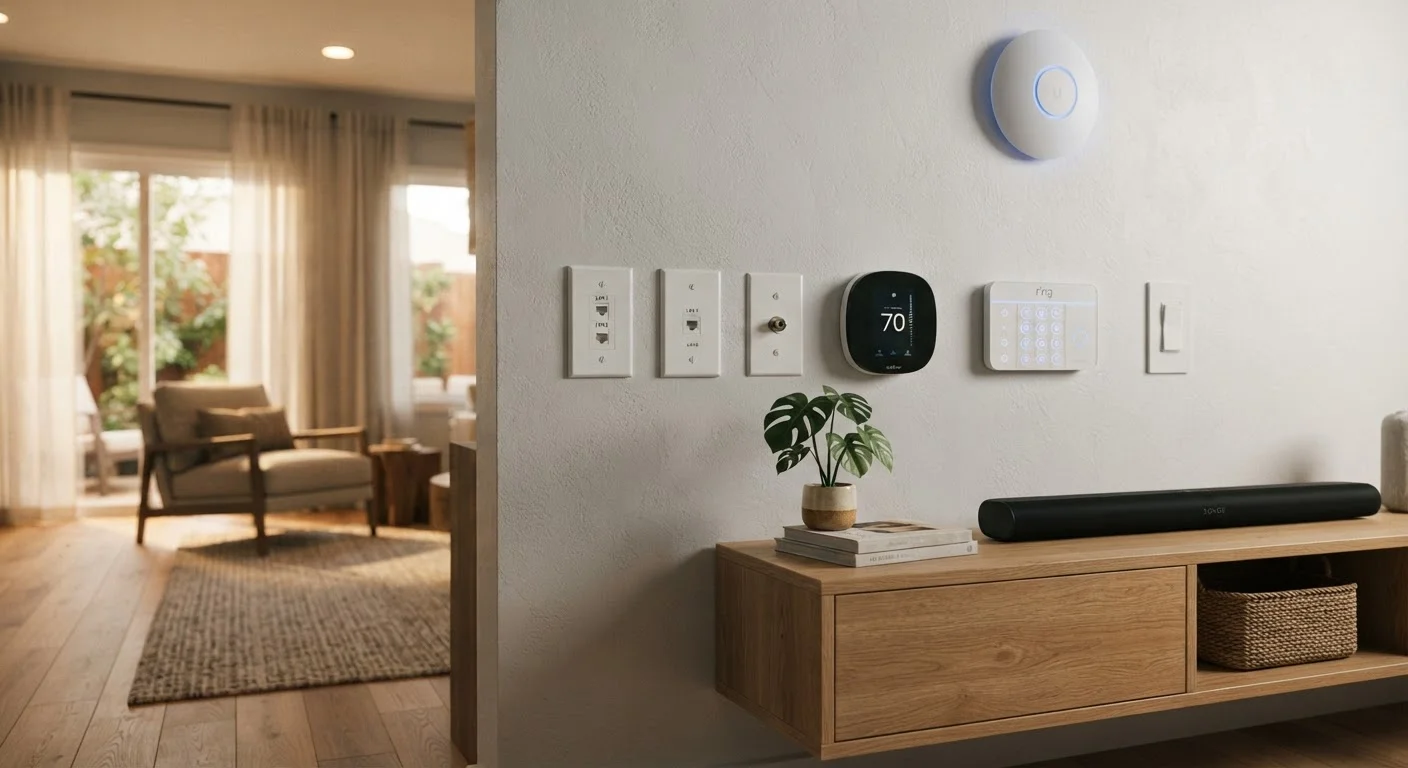
Neither wired nor wireless is universally superior - each excels in specific contexts. Wired installations are the right call for permanent, mission-critical devices in new builds or major renovations. Wireless devices win on flexibility, rental-friendly installation, and incremental expansion. Most practical smart home setups combine both.
| Best for | Recommended |
|---|---|
| New builds or whole-home renovations | Wired |
| Renters or those avoiding structural changes | Wireless |
| Critical systems like security or HVAC control | Wired |
| Incremental, room-by-room smart home expansion | Wireless |
What the Wired vs. Wireless Decision Actually Involves
When people talk about wired versus wireless smart home devices, they're really asking two separate questions: how the device gets its power, and how it communicates with the rest of the system. These can be independent. A hardwired light switch, for example, draws power from your home's electrical system but may still use a wireless protocol like Zigbee or Z-Wave to talk to a hub. Understanding that distinction helps avoid a common planning mistake.
For a broader grounding in how smart home systems connect and communicate, see our plain-language smart home overview before diving into the specifics here.
The wired-vs-wireless trade-off plays out differently depending on the device category. Thermostats, in-wall switches, security cameras, and doorbells all have different power and communication requirements - so there's rarely one universal answer across an entire home.
The Case for Wired Smart Home Devices
Wired devices - those with a physical data connection such as an Ethernet cable or a dedicated low-voltage bus - tend to offer three concrete advantages: reliability, latency, and longevity.
- Reliability: A wired connection doesn't compete with neighboring Wi-Fi networks, microwave ovens, or baby monitors for radio spectrum. If the physical cable is intact, the connection is there.
- Consistent latency: For time-sensitive applications like security sensors or motorized locks, the near-zero communication delay of a wired link matters more than it might seem.
- No battery management: Devices that draw from building power don't need battery swaps or recharging, which becomes significant as a system scales to dozens of devices.
The trade-off is installation complexity. Running new cables through finished walls requires fishing wire, drilling through framing, and sometimes patching drywall. This work is most economical during a new build or a gut renovation - retrofitting an existing home with extensive cabling is labor-intensive and expensive.
Plan Cable Runs Before Walls Close
If you're already doing any renovation that opens up wall cavities - even a small bathroom remodel - it's worth running a few extra conduit or Ethernet runs to nearby rooms while access is easy. The materials cost is low; the labor savings later can be substantial. Even unused conduit gives you a path for future wiring without tearing into finished surfaces.
The Case for Wireless Smart Home Devices
Wireless devices communicate via radio protocols - Wi-Fi, Zigbee, Z-Wave, Thread, or Bluetooth - and typically run on batteries or plug into a standard outlet. Their main advantages are flexibility and accessibility.
- No structural work: Wireless sensors, plugs, and cameras can be placed almost anywhere without touching walls.
- Renter-friendly: Devices that don't require wiring changes are removable, which matters in leased properties.
- Incremental expansion: Adding a new room to a wireless system usually means buying one device, not pulling cable.
The real-world downsides are worth taking seriously. Wireless signals can be disrupted by building materials - dense concrete, metal framing, and even certain insulation types reduce range. Device count and placement affect signal mesh quality significantly. If you've ever wondered why smart home devices drop off the network, interference and range limits are usually at the root of it.
Protocol fragmentation is another practical issue. Wi-Fi devices stress your router differently than mesh protocols like Zigbee or Z-Wave. For a detailed look at how these standards compare, our wireless standards guide covers each one in plain terms.
| Wired | Wireless | |
|---|---|---|
| Connection reliability | Very high - no signal interference | Moderate - depends on environment |
| Installation complexity | High - requires cable runs | Low - minimal structural work |
| Power source | Building electrical or PoE | Battery or standard outlet |
| Maintenance burden | Very low once installed | Battery replacement needed |
| Flexibility / relocatability | Low - fixed positions | High - easy to reposition |
| Best retrofit scenario | During renovation with open walls | Finished home, no structural work |
| Latency | Near-zero | Low to moderate, varies by protocol |
| Scalability cost | Higher per device added | Lower per device added |
How to Choose - and When to Combine Both
The most durable approach for most homeowners is a deliberate hybrid: wired infrastructure where permanence and reliability are non-negotiable, wireless at the edges where flexibility matters. A wired backbone - Ethernet to a central hub, hardwired in-wall switches - gives the system a stable foundation. Wireless sensors, plugs, and secondary cameras then extend coverage without structural disruption.
A few practical questions can guide the decision for any specific device:
- Is this a permanent installation? If yes, and walls are already open, wired is almost always worth the added effort.
- How critical is uptime? Security cameras covering entry points and smoke detectors warrant wired power at minimum.
- How many devices are planned? Large wireless device counts benefit from mesh protocols rather than all-Wi-Fi deployments.
- What's the home's construction? Older plaster walls or steel-frame buildings attenuate wireless signals more than standard wood-frame construction.
For guidance on building a system that stays manageable over time, the smart home setup principles that hold up as technology changes article is a useful next step. And if you're weighing the broader value proposition before committing to either approach, the honest case for and against smart home automation provides a balanced reality check.
~30%
Smart home owners reporting connectivity drops
Industry surveys consistently find roughly a third of smart home users experience periodic device disconnection, most commonly in wireless-only setups.
2-4×
Installation cost difference, wired vs. wireless retrofit
Home technology integrators generally estimate wired retrofits cost two to four times more in labor than equivalent wireless installations in finished homes.
The content on this site is for informational purposes only and is not a substitute for professional advice. Always consult a qualified professional for guidance specific to your situation.