

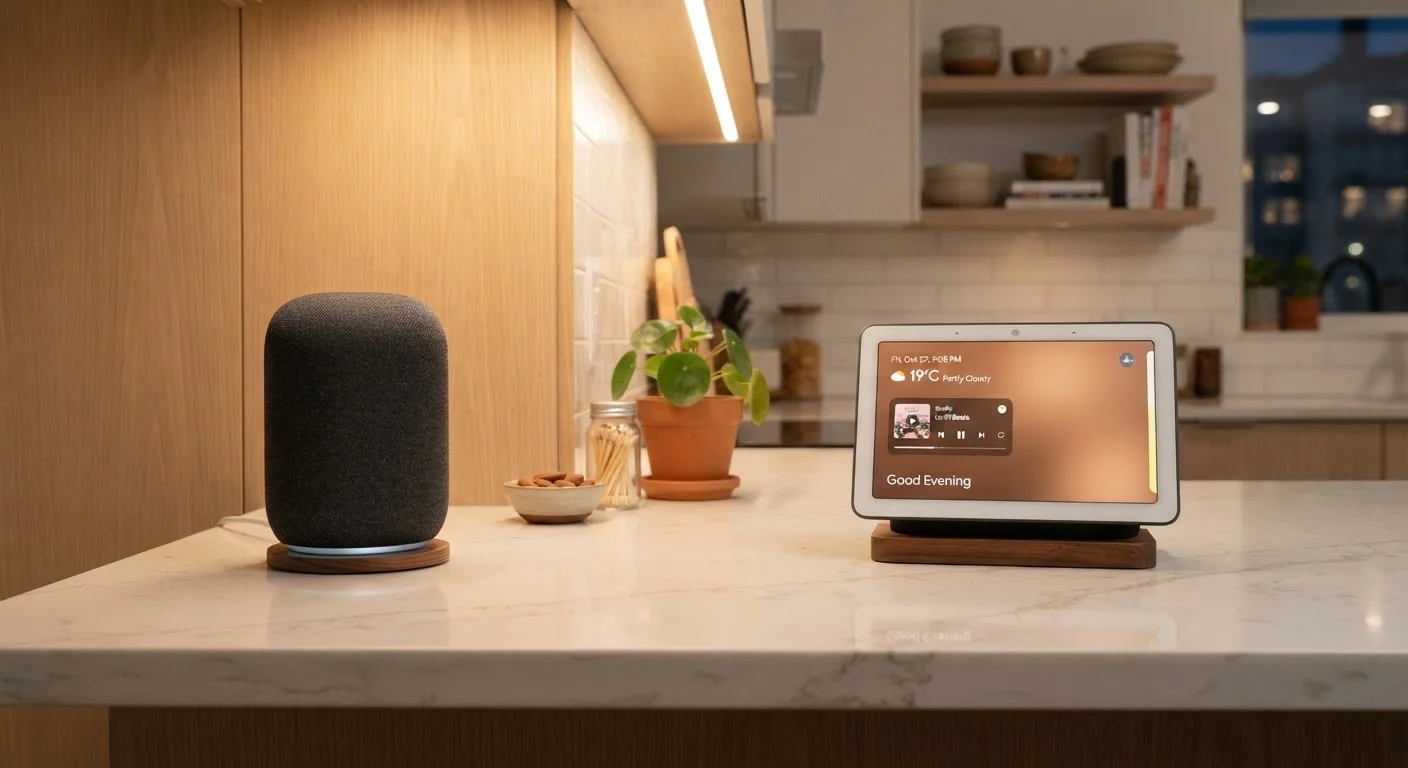
Option A
Smart Speaker
The voice-first, audio-centric hub.
Best for: Listeners and multitaskers who want hands-free control without needing to glance at a screen.
Option B
Smart Display
The screen-equipped, visual command center.
Best for: Households that want video calls, recipe walkthroughs, or visual smart home dashboards in a central space.
What Each Device Actually Does
Smart speakers are wireless, internet-connected audio devices built around a voice assistant - such as Amazon Alexa, Google Assistant, or Apple Siri. You speak a command, the device processes it, and you get a spoken response or action. That's the core loop. They're designed to be placed anywhere and operated entirely without looking at them.
Smart displays add a touchscreen - typically ranging from 5 to 15 inches - to that same foundation. They can show weather forecasts, YouTube videos, security camera feeds, calendar events, and video calls. Interaction happens through both voice and touch. Think of them as a hybrid between a smart speaker and a small tablet, fixed in one spot.
It's worth clearing up a common misconception: having a screen doesn't automatically mean better smart home control. Many assumptions about what these devices can and can't do are worth revisiting before you commit to either format. Both speakers and displays rely on the same underlying assistant ecosystem, so their smart home capabilities are largely equivalent - the screen just adds a visual layer on top.
| Criterion | Smart Speaker | Smart Display |
|---|---|---|
| Primary interaction | Voice only | Voice and touchscreen |
| Screen | None | 5-15 inch LCD/touchscreen |
| Video calling | Audio only | Full video with built-in camera |
| Typical footprint | Small; very portable | Larger; counter-mounted |
| Audio focus | Often higher priority | Secondary to screen |
| Privacy considerations | Microphone only | Microphone and camera |
| Smart home control | Voice commands | Voice + visual dashboard |
| Typical price range | Generally lower | Generally higher |
Sound Quality, Privacy, and Practical Trade-Offs
Audio performance is often underestimated in this comparison. Some smart speakers are engineered specifically for sound quality, with larger drivers and tuned acoustics. Smart displays prioritize the screen, so their speakers are typically thinner and more compact - sound is secondary. If music is your main use case, a dedicated smart speaker will generally outperform a same-priced display. For broader home audio context, see our overview of home audio formats and setups.
Privacy is another real consideration. Smart displays include cameras, which some households are comfortable with in a kitchen but not in a bedroom. Both device types use always-on microphones to detect wake words, though the specifics of how that processing works - and why mishearing happens - is more nuanced than most people expect. Understanding how voice assistants pick up commands can help set realistic expectations.
35%
U.S. adults owning a smart speaker
According to Pew Research Center data, roughly 35% of U.S. adults reported owning a smart speaker as of a recent survey period.
5-15 in
Typical smart display screen size range
Screen sizes across the smart display category span from compact 5-inch models to larger 15-inch variants suited for kitchen or living room use.
~2x
Approximate price premium for displays
Smart displays commonly carry a price roughly double that of entry-level smart speakers in the same ecosystem, reflecting the added screen and camera hardware.
Counter space and power requirements matter too. Smart displays need a permanent outlet and a dedicated spot. Smart speakers, especially compact models, can tuck into smaller spaces. If your kitchen counter is already crowded, that physical footprint factors into the decision as much as any feature list.
Choosing the Right Fit for Each Room
Room context shapes this decision more than most buyers initially realize. Here's a practical breakdown:
- Kitchen: Smart displays shine here. Timers, unit conversions, recipe videos, and one-tap shopping lists are genuinely useful when your hands are occupied. The screen earns its keep.
- Living room: Either can work, depending on your habits. If you already have a smart TV, a display may be redundant. A speaker positioned near a sofa handles music and smart home commands without competing with the television.
- Bedroom: Smart speakers are generally the better fit. Alarms, sleep sounds, and quick questions don't require a screen - and the absence of a glowing display helps maintain a sleep-friendly environment.
- Home office: A smart display can double as a video conferencing station and a reference screen, which adds genuine value if you work from home. A speaker works fine for simple task management and focus music.
If you're thinking about how either device fits into a broader connected home setup, it helps to understand how smart assistants relate to dedicated hubs and bridges. Our guide on smart home hubs, bridges, and routers explains what each piece of the ecosystem actually does.
Ecosystem Compatibility Matters
Both smart speakers and smart displays are tied to a specific voice assistant ecosystem - Alexa, Google Assistant, or Siri. Before purchasing, confirm that the device you're considering is compatible with the smart home devices you already own or plan to add. Mixing ecosystems can create friction and limit which features actually work together.
The content on this site is for informational purposes only and is not a substitute for professional advice. Always consult a qualified professional for guidance specific to your situation.